A Firewall, as shown in Figure 1, puts up a barrier that controls the flow of traffic between networks. The safest firewall would block all traffic, but that defeats the purpose of making the connection, so you need to strictly control selected traffic in a secure way. The highest level of protection today is provided by application-level proxy servers. In Figure 1, proxy services run at the application level of the network protocol stack for each different type of service (FTP, HTTP, etc.).
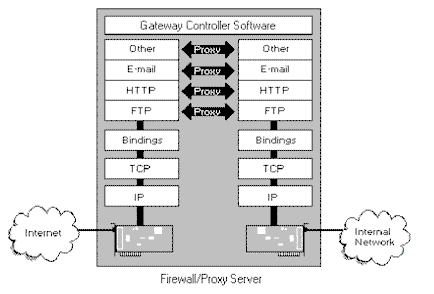
A proxy server is a component of a firewall that controls how internal users access the outside world (the Internet) and how Internet users access the Internal network. In some cases, the proxy blocks all outside connections and only allows internal users to access the Internet. The only packets allowed back through the proxy are those that return responses to requests from inside the firewall. In other cases, both inbound and outbound traffic are allowed under strictly controlled conditions. Note that a virtual “air-gap” exists in the firewall between the inside and outside networks and that the proxies bridge this gap by working as agents for internal or external users.
This paper covers firewalls and proxy servers in general. More detailed information about firewalls and proxy servers can be found in The Windows Security Handbook. It also includes detailed information about Microsoft’s Proxy Server.
In addition, readers who want to explore firewall concepts and architecture in more detail should refer to the following books:
Firewalls and Internet Security: Repelling the Wily Hacker. William R. Cheswick and Steven M. Bellovin. Addison-Wesley, Reading, MA. 1994.
Building Internet Firewalls. D. Brent Chapman and Elizabeth D. Zwicky. O’Reilly & Associates, Sebastopol, CA. 1995.
The books and their authors are the usual sources of reference in just about any article or book you’re likely to read on modern network security. Although the authors are UNIX experts, the books deal primarily with TCP/IP networks and the Internet–the focus for almost any discussion of firewalls.
Defensive Strategies
Discussions about protecting networks usually focus on threats from the Internet, but internal users are also a threat. Indeed, surveys indicate that most unauthorized activities are perpetrated by internal users. In addition, organizations that connect with business partners over private networks create a potential avenue for attack. Users on the business partner’s network may take advantage of the inter-company link to steal valuable information.
The current trend is to implement data encryption on all network transmissions. Encryption can take place right at the source of the transmission for the highest security, whether it is the client on the LAN or the router that connects wide area networks.
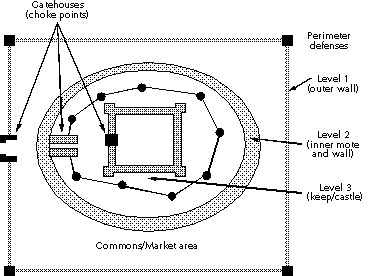
Firewalls are often described in terms of perimeter defense systems, with a so-called “choke point” through which all internal and external traffic is controlled. The usual metaphor is the medieval castle and its perimeter defense systems, as pictured in Figure 2. The moats and walls provide the perimeter defense, while the gatehouses and drawbridges provide “choke points” through which everyone must travel to enter or leave the castle. You can monitor and block access at these choke points.
Dr. William Hancock, a well-known firewall expert with Network-1 Software and Technology (www.network-1.com) in Grand Prairie, TX, describes firewalls this way:
The concept [of security barriers] is much like that of the strong castle being protected by a series of moats around the castle. As the storming hoards gets close to the castle, they must traverse the series of moats. It is possible to traverse some moats with pole vault activities, but eventually the leaper of the moat is bound to fall into one of the moats and is caught. If there is only one moat and the leaper is good, there is not much protection. If there are moats, concertina wire, razor wire, tall fences with broken glass on them, land mines, cans full of pennies suspended by trip wires, Doberman pinschers and other such traps in the path from the intruder to the “jewels,” one or more of the obstacles is going to alert the keepers of the castle that someone is trying to infiltrate the castle and
something must be done to protect the assets and destroy the intruder. Firewall products provide a “moat-like” barrier control method for network assets which varies dramatically with the product selection. The typical use of a firewall product in a network is to isolate corporate assets from each other and from the outside world in a secure and manageable manner.
While the storming hoard analogy might be appropriate in some cases, the real threat is often the stealthy spy who slips over walls in the dark of night and scales every barrier undetected to reach his target of attack.
If a firewall is like a castle, how far do you let people into it, and what do you allow them to do once inside? Local townspeople and traders were usually allowed to enter the market yard of the castle with relative ease so they could deliver or pick up goods. At night, the gates were closed, and goods were brought into the castle–usually after close inspection. Following this analogy, the market yard could be compared to the public Web and FTP servers that you connect to the Internet for general availability.
While just about anybody could enter the market yard, only trusted people and people with special credentials were allowed into the inner perimeters of the castle. Within these walls is the keep, a heavily fortified structure that provides the last defense against attackers.
NOTE: Interestingly, the castle proved quite capable of withstanding attacks until the cannon came along. In the 16th century, Essex and Cromwell overran many castles in Ireland with little artillery. They simply blew the parapets off the top of castle walls to make them indefensible, then scaled the walls. What similar weapons will our network defenses face?
In Europe, there were many different types of strongholds. Tower homes were relatively simple defensive structures designed to protect residents from marauding bands of looters and neighboring clans. Still larger castles with massive walls and bastions were built by the wealthiest of clans. Similarly, businesses with the biggest budgets or the most valuable information to protect build the strongest defenses.
Like the multiple perimeter defenses of the castles, multiple firewall devices can be installed to keep wily hackers out of your networks. The spies or assassins vaulted moats and scaled walls to reach their targets. Of course, it helped if the castle guards were sleeping, so don’t slack off on your own defense. You can build a “trip wire” defense by putting “relatively weak” devices on the outer edge of your defense that sound alarms when attacked.
In times of peace, the rulers of a castle would meet with local townspeople, tradesmen, and dignitaries from other areas. Any direct meeting with the king or queen was usually preceded by a strip search. But if the political situation was tense, the ruler might prefer to avoid direct contact with visitors. In this case, the protocol was for all visitors to meet with the agent of the king or queen, who would then relay messages between parties. The agent provided proxy services.
Firewalls have been designed around these two approaches. A packet filtering firewall uses the strip-search method. Packets are first checked and then either dropped or allowed to enter based on various rules and specified criteria. A proxy service acts as an agent for a user who needs to access a system on the other side of the firewall. A third method, called stateful inspection, is also coming into use. This method would be analogous to a gatekeeper remembering some defining characteristics of anyone leaving the castle and only allowing people back in with those characteristics.
Once in place, a firewall, just as a castle, requires constant vigilance. If someone can climb your fence at night when no one is looking, what good is the fence? Security policies and procedures must be put into place. In defending a castle, the archers and boiling oil men need a defensive strategy, and they need regular drills to ensure that the strategy works. If your internal systems are hit by flaming arrows, you’ll need a disaster recovery plan to quench the flames and get the system back online.
Castle parapets and towers protect the soldiers who defend the castles. Without defenders, the castle is vulnerable to attackers that scale walls or knock down doors. Likewise, your firewall is not a stand-alone device. You need to manage and monitor it on a regular basis and to take action in the event of an attack. It is also only one part of your defense. If the attackers do get inside, you need to keep them from looting your systems by implementing security measures at each domain and server.
This brings up another point. While firewalls are keeping Internet intruders out, your internal users might be looting your systems. You may need to separate departments, workgroups, divisions, or business partners using the same firewall technology, and you may need to implement encryption throughout your organization. Firewalls also do not protect against leaks, such as users connecting to the outside with a desktop modem. In addition, if some new threat comes along, your firewall might not be able to protect against it. Viruses and misuse of security devices are also a threat.
NOTE: This entire discussion avoids the problems of packet sniffing, session hijacking and other problems. Data encryption is the solution to these problems.
Classifying Firewalls
Any device that controls network traffic for security reasons can be called a firewall, and in fact the term “firewall” is used in a generic way. However, there are three major types of firewalls that use different strategies for protecting network resources. The most basic firewall devices are built on routers and work in the lower layers of the network protocol stack. They provide packet filtering and are often called screening routers. High-end proxy server gateways operate at the upper levels of the protocol stack (i.e., all the way up to the application layer). They provide proxy services on external networks for internal clients and perform advanced
monitoring and traffic control by looking at certain information inside packets. The third type of firewall uses stateful inspection techniques.
Routers are often used in conjunction with gateways to build a multitiered defense system, although many commercial firewall products may provide all the functionality you need.
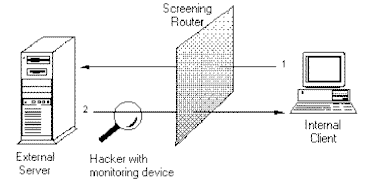
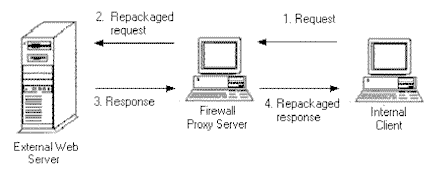
Figure 3 and Figure 4 illustrate the differences between screening routers and proxy servers, both of which are described in the next few sections.
Screening Router (Packet Filters)
Screening routers can look at information related to the hard-wired address of a computer, its IP address (Network layer), and even the types of connections (Transport layer) and then provide filtering based on that information. A screening router may be a stand-alone routing device or a computer that contains two network interface cards (dual-homed system). The router connects two networks and performs packet filtering to control traffic between the networks.
Administrators program the device with a set of rules that define how packet filtering is done. Ports can also be blocked; for example, you can block all applications except HTTP (Web) services. However, the rules that you can define for routers may not be sufficient to protect your network resources, especially if the Internet is connected to one side of the router. Those rules may also be difficult to implement and error-prone, which could potentially open up holes in your defenses.
Proxy Server Gateways
Gateways work at a higher level in the protocol stack to provide more opportunities for monitoring and controlling access between networks. A gateway is like a middle-man, relaying messages from internal clients to external services. The proxy service changes the IP address of the client packets to essentially hide the internal client to the Internet, then it acts as a proxy agent for the client on the Internet.
Using proxies reduces the threat from hackers who monitor network traffic to glean information about computers on internal networks. The proxy hides the addresses of all internal computers. Traditionally, using proxies has reduced performance and transparency of access to other networks. However, current firewall products solve some of these problems.
There are two types of proxy servers:
Circuit-Level Gateway
This type of proxy server provides a controlled network connection between internal and external systems (i.e., there is no “air-gap”). A virtual “circuit” exists between the internal client and the proxy server. Internet requests go through this circuit to the proxy server, and the proxy server delivers those requests to the Internet after changing the IP address. External users only see the IP address of the proxy server. Responses are then received by the proxy server and sent back through the circuit to the client. While traffic is allowed through, external systems never see the internal systems. This type of connection is often used to connect
“trusted” internal users to the Internet.
Application-Level Gateway
An application-level proxy server provides all the basic proxy features and also provides extensive packet analysis. When packets from the outside arrive at the gateway, they are examined and evaluated to determine if the security policy allows the packet to enter into the internal network. Not only does the server evaluate IP addresses, it also looks at the data in the packets to stop hackers from hiding information in the packets.
A typical application-level gateway can provide proxy services for applications and protocols like Telnet, FTP (file transfers), HTTP (Web services), and SMTP (e-mail). Note that a separate proxy must be installed for each application-level service (some vendors achieve security by simply not providing proxies for some services, so be careful in your evaluation). With proxies, security policies can be much more powerful and flexible because all of the information in packets can be used by administrators to write the rules that determine how packets are handled by the gateway. It is easy to audit just about everything that happens on the
gateway. You can also strip computer names to hide internal systems, and you can evaluate the contents of packets for appropriateness and security.
NOTE: Appropriateness is an interesting option. You might set up a filter that discards any e-mail messages that contain “dirty” words.
Stateful Inspection Techniques
One of the problems with proxies is that they must evaluate a lot of information in a lot of packets. In addition, you need to install a separate proxy for each application you want to support. This affects performance and increases costs. A new class of firewall product is emerging that uses stateful inspection techniques. Instead of examining the contents of each packet, the bit patterns of the packets are compared to packets that are already known to be trusted.
For example, if you access some outside service, the server remembers things about your original request like port number, and source and destination address. This “remembering” is called saving the state. When the outside system responds to your request, the firewall server compares the received packets with the saved state to determine if they are allowed in.
While stateful inspection provides speed and transparency, one of its biggest disadvantages is that inside packets make their way to the outside network, thus exposing internal IP addresses to potential hackers. Some firewall vendors are using stateful inspection and proxies together for added security.
The debate over whether proxies or stateful inspection techniques are better rages on. If you are choosing a firewall, talk to vendors and read the product reviews. In the meantime, some router vendors such as Bay Networks and Ascend are starting to implement firewalls in their router products, closing the gap between inexpensive hardware-based devices and high-end application-level servers.
Firewall Policies
If an intruder can find a hole in your firewall, then the firewall has failed. There are no in-between states. Once a hacker is in, your internal network is at her mercy. If she hijacks an administrative account, you’re in big trouble. If she hijacks an account with lesser privileges, all the resources available to that account are at risk.
No firewall can protect against inadequate or mismanaged policies. If a password gets out because a user did not properly protect it, your security is at risk. If an internal user dials out through an unauthorized connection, an attacker could subvert your network through this backdoor. Therefore, you must implement a firewall
policy.
Obviously, the firewall and the firewall policy are two distinct things that require their own planning and implementation. A weakness in the policy or the inability to enforce the policy will weaken any protection provided by even the best firewalls. If internal users find your policies too restrictive, they may go around them by connecting to the Internet through a personal modem. The firewall in this case is useless. You may not even know your systems are under attack because the firewall is guarding the wrong entrance.
The most basic firewall policy is as follows:
Block all traffic, then allow specific services on a case-by-case basis.
This policy is restrictive but secure. However, it may be so restrictive that users circumvent it. In addition, the more restrictive your policy, the harder it will be to manage connections that are to be allowed. On screening routers, you’ll need to implement complicated sets of rules–a difficult task. Most firewall products including the Microsoft Proxy Server simplify this process by using graphical interfaces and a more efficient set of rules.
Security policies must be outlined in advance so administrators and users know what type of activities are allowed on the network. Your policy statement should address internal and external access, remote user access, virus protection and avoidance, encryption requirements, program usage, and a number of other considerations, as outlined here:
Network traffic to and from outside networks such as the Internet must pass through the firewall. The traffic must be filtered to allow only authorized packets to pass. Never use a firewall for general-purpose file storage or to run programs, except for those required by the firewall. Do not run any services on the firewall except those specifically required to provide firewall services. Consider the firewall expendable in case of an attack. Do not allow any passwords or internal addresses to cross the firewall. If you need to provide services to the public, put them on the outside of the firewall and implement internal settings that protect the server from attacks that would deny service. Accept the fact that you might need to completely restore public systems from backup in the event of an attack. You can implement a replication scheme that automatically copies information to a public server over a secure channel, as discussed at the end of this chapter.
For outbound connections, implement any number of encryption schemes to hide transmitted information. If users are accessing the Web with Web browsers, you can implement Web client-server security protocols and encryption techniques.
You also need to evaluate what kind of traffic you want to allow in from the external side of the network. Electronic mail is the usual requirement. Be sure to evaluate Microsoft Exchange Server for this purpose. Not only does it provide a feature-rich platform for information exchange, it also provides a secure platform for electronic mail exchange between the Internet and your internal network.
General Firewall
White Paper
This white paper discusses firewalls in general and
for the Windows environment.
By Tom Sheldon, November 1996
Windows is a registered trademark of Microsoft
Corporation
This material is taken from the Windows NT
Security Handbook by Tom Sheldon, published by
Osborne McGraw-Hill, October 1996.
 REMES.net